Savoo's Top PDF Expert Picks
PDF Expert Lifetime Plan for £129.99
Free PDF Template at PDF Expert
Free Download at PDF Expert
More PDF Expert Discount Codes & Deals
Best PDF Reader at PDF Expert
PDF Expert Yearly Plan for £79.99
Reduce PDF File Size on Mac at PDF Expert
Password Protect Your File at PDF Expert
PDF Expert Plans from £1.40 per Week
Learn How to Redact Texts in PDF Documents at PDF Expert
Responsible Disclosure Policy at PDF Expert
Edit PDF Files at PDF Expert
Fill Out PDF Forms at PDF Expert
Popular PDF Expert Discount Codes
| Discount | Last verified | Redemptions |
|---|---|---|
| PDF Expert Lifetime Plan for £129.99 | 15 Oct, 2026 | Used 1 Time |
| Free PDF Template at PDF Expert | 15 Oct, 2026 | Used 1 Time |
| Free Download at PDF Expert | 15 Oct, 2026 | Used 7 Times |
| Best PDF Reader at PDF Expert | 15 Oct, 2026 | Used 1 Time |
| PDF Expert Yearly Plan for £79.99 | 15 Oct, 2026 | Used 1 Time |
Savoo - Discount Codes You Can Trust!
Download PDF Expert for Free
PDF Expert offers a free download for Apple customers. It costs you nothing and lets you access some of PDF Expert's best features. Although not everything, it’s a fantastic way to read, annotate, and edit PDF forms for free. If you need to make significant changes to the PDF, such as converting formats or redacting text, you can upgrade to the paid version.
Include a PDF Expert discount code when upgrading to try out the software for less.

By Ryan Broadfoot, your PDF Expert Money Saving Editor
Last checked 5 days ago
Today's top PDF Expert discount codes
| Total Offers | 12 |
How to Save at PDF Expert
Save Money with a PDF Expert Subscription
A yearly PDF Expert subscription offers better value for money than a weekly rolling one. It’s 25% cheaper to sign up for a year with PDF Expert and enjoy conversion tools, OCR, translation, and PDF editing. Sign up once, pay weekly, and you won’t need to keep remembering to renew it.
Get a Free Trial for PDF Expert
Try the 7-day PDF Expert trial. See whether the upgrades are worth your time during the trial, and whether the difference between the free and paid software is enough to warrant a subscription. Just make sure you cancel 24 hours before the trial ends to avoid automatic renewal charges.
Cover All Your Devices
You don’t need to buy separate tools for Mac, iPhone and iPad, as the PDF Expert subscription covers all your devices. Save money on buying one subscription for your phone, another for your tablet and another for your desktop with PDF Expert’s all-in-one tools.
About PDF Expert
PDF Expert is a premium PDF editor and annotator developed by Readdle for Mac, iPad, and iPhone. This editing software lets you amend text, images, and links, as well as sign, organise, and convert documents. The software also features AI-powered tools to help summarise PDFs.
Get the most advanced PDF editing capabilities ever created for Apple software with PDF Expert. Whether you’re a business owner, a contractor or a student, PDF Expert can change the game. And remember to use a PDF promo code at checkout to maximise your earnings and productivity.
Helpful Links For PDF Expert
Popular Brands
- Argos
- Currys
- Debenhams
- Samsung
- ao.com
- Boots
- Halfords
- Domino's
- Wayfair
- TUI
- New Look
- adidas
- PrettyLittleThing
- Moonpig
- Very
- NOW
- John Lewis
- SPORTS DIRECT
- Expedia
- Myprotein
- B&Q
- My 1st Years
- Notino
- SHEIN
- Stradivarius
- Toolstation
- Bloom and Wild
- Asos
- boohoo
- First Choice
- Superdrug
- JD Sports
- Travelodge
- Dunelm
- Temu
PDF Expert FAQs
Can I get a PDF Expert discount code?
PDF Expert discount codes have been live in the past, but they are not frequently available. The best discount Savoo has seen with a PDF Expert code was 15%, but most customers save with introductory discounts and ongoing promotions. Deals like up to 50% off subscriptions and 30% off for academics are far more common.
There is also a free trial, making it easy to try PDF Expert before you buy. Stay tuned to Savoo to find the latest PDF Expert deals in one convenient place.
Is PDF Expert a subscription service?
Yes, PDF Expert is primarily a subscription-based service. While it offers a free version, this has limited features and does not offer text editing. So while you don’t need to subscribe to PDF Expert, if you don’t have a subscription, you’re missing out on a lot.
How do I cancel my PDF Expert subscription?
You can cancel your subscription at any time via the subscription section of the PDF Expert app or via the View My Account section of the website.
What is the difference between Adobe Acrobat and PDF Expert?
PDF Expert is a fast, more intuitive application that is optimised for Mac, iPhone, and iPad users. PDF Expert is generally faster and easier to use than Adobe Acrobat, making it easier for newbies to open large documents.
The key difference is that Adobe Acrobat runs on Windows, whereas PDF Expert is currently available only on Apple devices. If you do use Apple, PDF Expert offers a more affordable one-time purchase or a cheaper subscription, whereas Acrobat has a much higher-priced subscription.
Is there a PDF Expert app?
Yes, there is a PDF expert app for iPhone, Mac, iPad, and Vision. This easy-to-use app has all the features you need to read PDFs, highlight and annotate and fill out forms in the palm of your hand. Unlike other PDF readers, the app is included in your subscription.
How do I delete files from PDF Expert on my iPad?
To delete the file, open it in PDF Expert and tap the Page thumbnails icon. Then tap Select, tick the page or pages you want to delete, and tap Done. It’s as easy as that!
How to Save More Money at PDF Expert
Enjoy a 30% Educational Discount
If you’re a student or work in education, save 30% at PDF Expert. Simply sign up using your student or work email to open up a world of PDF reader discounts automatically. Students without a uni email can verify their status via their Student Beans account. Manage academic materials, use the tool to highlight and annotate content, access PDF files offline and save on printing costs with a discounted PDF Expert subscription.
Get Free Templates
Save time and money by using a free template available on the PDF Expert website. These templates are ideal for making contracts look professional, planning lessons as a teacher and applying for a job. Before spending time making your own, take a look at what they have already put together. It’s an easy way to deliver high-quality, professional documents every time.
Check Out the Free Resources
The Resource section of the PDF Expert website provides everything you need to succeed and make the most of your new software download. From how-to guides to help and tips on customising your new PDF, you’ll find it here. Don’t waste money on software with features you can’t use to their full potential with these expertly written guides.
How Do I Use a PDF Expert Discount Code?
- Find a PDF Expert coupon on our website.
- Open up the PDF Expert promo code and copy it.
- Head to the PDF Expert website.
- Choose your premium plan.
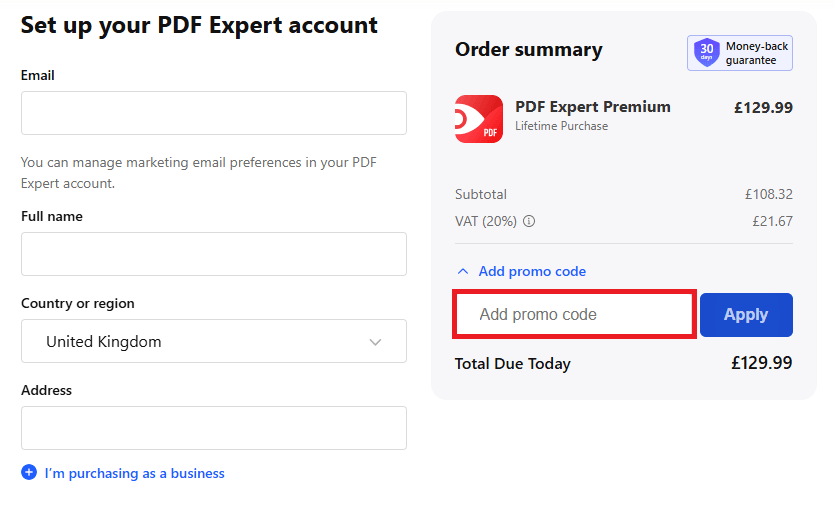
- Click Add Promo Code during checkout.
- Paste your code into the box and click 'Apply'.
- Set up your PDF Expert account and choose your payment plan.
Recently Expired PDF Expert Discount Codes & Deals
Similar Voucher Codes and Deals

5% off orders at BLUETTI
- Code promise
- Includes Sale


5% off Selected orders at Philips
- Code promise
- Includes Sale

8% off Full-Priced orders at Vampire Vape
- Code promise
- Includes Sale

10% off First order at Vapoholic
- Code promise
- Includes Sale