
Savoo's Top Roamic Picks
10% off eSim orders at Roamic
5% off orders at Roamic
- Code promise
- Exclusive

You will find 13 Roamic deals active in October, including an ongoing Roamic discount code that saves eSIM customers 10%. Our team last checked this page on Monday, so you can be certain that all promotions are valid. The referral programme and larger data bundle pricing mean there are genuine ways to reduce what you pay beyond codes alone.
Roamic Unlimited Data
Special Offers and Discounts with Roamic's Newsletter Sign Up
More Roamic Discount Codes & Deals
Easy Setup at Roamic
Australia eSim from £2 at Roamic
No Hidden Charges at Roamic
Buy Now, Pay Later with Klarna at Roamic
Europe eSim from £2 at Roamic
Coverage in 190 Countries at Roamic
Asia eSim from £2 at Roamic
Roamic eSIM Destinations
Africa eSim from £8 at Roamic
Popular Roamic Discount Codes
| Discount | Last verified | Redemptions |
|---|---|---|
| 10% off eSim orders at Roamic | 26 Oct, 2026 | Used 198 Times |
| 5% off orders at Roamic | 26 Oct, 2026 | Used 300 Times |
| Special Offers and Discounts with Roamic's Newsletter Sign Up | 26 Oct, 2026 | Used 50 Times |
| Roamic Unlimited Data | 26 Oct, 2026 | Used 60 Times |
| Africa eSim from £8 at Roamic | 26 Oct, 2026 | Used 18 Times |
Savoo - Discount Codes You Can Trust!
Pick a charity to donate for free as you save!
Choose from one of our featured charities below, or see all charities and we'll donate up to 10% of your order when you use a Roamic deal!


Create a Roamic Account to Receive Promotional Emails
Sign up for the Roamic mailing list to hear about upcoming e-SIM discounts. When you create an account, make sure you tick the box that says ‘Email me with news and offers’ to ensure you get newsletters sent to your inbox. Members have previously been sent a Roamic discount code occasionally, so don’t miss out by registering today.

By Ryan Broadfoot, your Roamic Money Saving Editor
Last checked yesterday
Savoo's Top Roamic Savings Tips
Refer a Friend to Get Money off
Roamic has a referral program where you can earn rewards. If someone you invite makes a purchase, you’ll receive a €2 discount for your next order. The voucher might not cover the whole cost of a plan, but you can use it with other promotions to save more. For the most up-to-date terms and eligibility, check roamic.com.
Choose a Larger Data Bundle for a Lower Cost
Enjoy better value by choosing larger data bundles, as the price per gigabyte is lower than on smaller starter plans. If you plan to travel for a week or longer, choosing a larger plan when you buy is a simple way to save money. This pricing approach is especially true for Roamic's European plans, but you’ll find similar savings in most destinations.
About Roamic
Roamic makes it simple and affordable to stay connected while you travel. Rather than looking for a SIM card at the airport or paying expensive roaming charges, you can buy a digital eSIM plan from Roamic before you leave. Just scan a QR code, and you’ll be online in about a minute. With plans for over 190 countries and prices starting at only £0.99, Roamic is a smart option for any budget.
You can only buy Roamic on roamic.com, and everything is delivered digitally. There’s no need for a physical SIM, postage, or waiting. You can choose from country-specific, regional, or global plans, so whether you’re visiting one place or travelling across continents, there’s an option for you. Unlimited data plans give you 3GB of full-speed data per day, and after that, speeds are reduced to 1Mbps instead of charging extra fees.
Helpful Links For Roamic
Popular Brands
- Argos
- Currys
- Debenhams
- Samsung
- ao.com
- Boots
- Halfords
- Domino's
- Wayfair
- TUI
- New Look
- adidas
- PrettyLittleThing
- Moonpig
- Very
- NOW
- John Lewis
- SPORTS DIRECT
- Expedia
- Myprotein
- B&Q
- My 1st Years
- Notino
- SHEIN
- Stradivarius
- Toolstation
- Bloom and Wild
- Asos
- boohoo
- First Choice
- Superdrug
- JD Sports
- Travelodge
- Dunelm
- Temu
Roamic FAQs
How much can I save with a Roamic discount code?
Roamic savings depend on the current promotion. In the past, codes have offered 5% to 15% off during peak times, usually between January and April. For the rest of the year, discounts are typically between 5% and 10%. The best way to find the biggest savings is to check this page regularly for new codes.
Why isn't my Roamic discount code working?
The most common reasons are an expired code, an ineligible plan or destination, or incorrect entry due to extra spaces or capitalization. Please ensure you have not already applied another code to this order, as only one code is allowed. If the issue persists, contact Roamic support at info@roamic.com for assistance.
Is my phone compatible with a Roamic eSIM?
Most modern smartphones support Roamic eSIMs, including iPhone XS and later, Google Pixel 3 and later, and Samsung Galaxy S20 and later. To confirm compatibility, dial #06# on your device; if an EID appears, your device supports eSIM. Please note that some Chinese-market variants do not support eSIM, so verify before purchasing. The full compatibility list is available at roamic.com/pages/compatibility.
Can I top up my Roamic eSIM if I run out of data mid-trip?
Yes, it is straightforward to top up your eSIM. Log in to the MyRoamic platform through the website or app, select your active eSIM, and tap the top-up option. Your plan will update within seconds. Please note, the top-up function is only available while your plan is active. If your plan has expired, contact Roamic support for assistance.
What happens to my data speed after I hit 3GB in a day on an unlimited Roamic plan?
If you use 3GB at full speed in a day, your speed will drop to 1Mbps until the next 24-hour period begins. There are no extra charges. For most browsing, messaging, and using maps, 1Mbps should work fine. You’ll mostly notice slower speeds when streaming videos or doing other high-bandwidth activities.
What payment methods does Roamic accept?
Roamic accepts Visa, Mastercard, American Express, Maestro, Union Pay, PayPal, Apple Pay, Google Pay, Klarna, iDEAL Wero, Bancontact, BLIK, and MobilePay. With this wide selection, most people will find their favorite way to pay.
Ways to Get a Better Deal at Roamic
Buy Your eSIM in Advance
If you want to save money, you can buy an Roamic eSIM well before your trip. You can install the plan up to 180 days ahead, and it won’t use any data until you activate it. This means you can take advantage of the best discounts by buying early.
Top up Instead of Repurchasing
It’s annoying to run out of data while you’re traveling, but you don’t need to buy a new eSIM plan. With the MyRoamic app, you can easily add more data to your current plan from your phone. This is usually cheaper than getting a new plan, and your eSIM keeps working without any interruption.
No Delivery Costs
Since Roamic only offers digital products, you don’t have to worry about delivery fees. After you pay, you’ll get a QR code and full installation instructions in your inbox right away. There’s no waiting, postage, or customs delays. Setting up takes about a minute. Just scan the QR code with your phone’s camera, and your eSIM will be ready to use.
How to Use Roamic Discount Codes
- Go to Roamic and pick your destination from the menu. You can choose from Africa, Europe, Asia, North America, South America, or Australia.
- Look through the available plans for your destination and pick the one that matches your trip length and data needs.
- Add your chosen plan to your cart.
- Go to checkout.
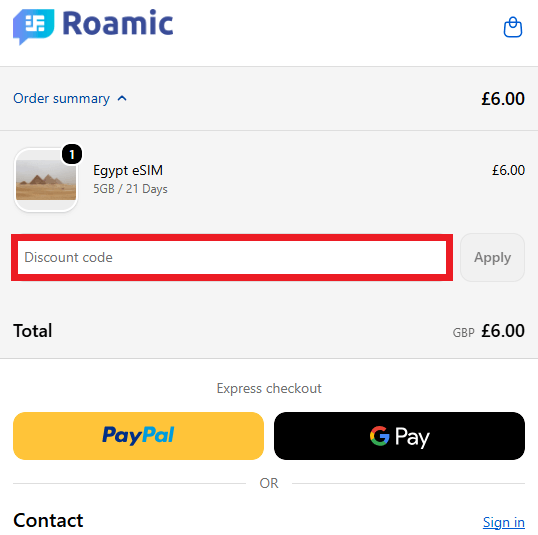
- Find the discount code box at checkout and enter your Roamic code exactly as it appears, paying attention to capital letters.
- Click "Apply." Your savings should show up in your order total right away.
- If the discount does not work, check if your plan is eligible. Some codes work for all plans, but others only apply to certain destinations or types.
- Finish your payment with your preferred method. You will get your QR code and installation instructions by email right away.
Recently Expired Roamic Discount Codes & Deals
Similar Voucher Codes and Deals

5% off Selected orders at Philips
- Code promise
- Includes Sale

£50 off Selected orders at ao.com
- Code promise
- Includes Sale